ntrboot
Required Reading
ntrboot refers to the ability for all 3DS family consoles to boot into a special, recovery-mode cartridge to perform actions before any other part of the operating system loads. It is commonly used for data recovery and unbricking, but can also be used to install boot9strap, a custom firmware loader.
To use ntrboot, a compatible cartridge (normally a 'flashcart') is required. Many flashcarts from the NDS or DSi era can be repurposed for ntrboot, while new ones can be purchased for roughly $20 USD.
No matter how you run ntrboot, you will need a small magnet that is strong enough to put the console into sleep mode (except on the Old 2DS, which uses a sleep switch). To test if a magnet will work, hold it on or around the (A)(B)(X)(Y) buttons while the console is powered on to see if it triggers sleep mode. If it does, both displays will go black as long as the magnet is held in that spot.
Recommended for new purchases
If you don't already have a flashcart, or if your flashcart is incompatible with ntrboot, it is recommended to purchase one of these.
Cartridges may be available for a cheaper price through a local distributor or on AliExpress. For more information, see the NTRBoot Quick Start Guide (in English only).
| Flashcart | Price | Notes |
|---|---|---|
| DSpico | $25.99 | Must be flashed using a computer (using a microUSB or USB-C cable, depending on the cartridge). This cart needs a microSD card inserted to function for both ntrboot and regular NDS firmware. |
| Ace3DS X | $24.99 | Comes pre-flashed with ntrboot (external switch to switch between ntrboot ("3DS") and NDS modes); do not manually flash with ntrboot. This cart needs a microSD card inserted to function for both ntrboot and regular NDS firmware. |
TIP
If you have a DSpico, you will need to flash it with an ntrboot-compatible firmware. To do so:
- Download DSpico_Hybrid_B9S-1.3_GCD.uf2
- Remove the microSD card from your DSpico
- Connect the DSpico to your computer using a microUSB or USB-C cable (depending on the cartridge)
- A
RPI-RP2drive should appear on your computer
- A
- Copy
DSpico_Hybrid_B9S-1.3_GCD.uf2to the root of theRPI-RP2drive (not inside any folder)- The drive should automatically disconnect itself after a few seconds
- After the drive has disconnected itself, disconnect the DSpico from your computer and reinsert the microSD card
- The hybrid firmware has been successfully flashed :::
TIP
Once your cartridge is flashed with ntrboot, you can continue to Installing boot9strap (ntrboot). You can ignore the rest of this page.
Other Flashcarts
If you already have a flashcart that isn't a DSpico or Ace3DS X, you can check this list to see if it can be flashed with ntrboot.
While the ntrboot exploit works independently of the system version, the ntrboot flasher (which installs the exploit to the cart) is not. This means that, depending on the versions and consoles supported by your flashcart, only certain methods may be available to you.
Note that carts with a "Time Bomb" will no longer be able to launch .nds files when they detect that the system clock has passed a date determined by the flashcart firmware. One method to bypass this is to set the system clock to an earlier date.
| Flashcart | Price | "Time Bomb"? | 3DS Versions? | DSi Versions? | Other Notes |
|---|---|---|---|---|---|
| R4i-SDHC B9S (r4i-sdhc.com) | Out of Stock | September 3, 2024 | ALL | ALL | Comes pre-flashed with ntrboot; can be flashed back to an NDS flashcart. |
| DSTT (ndstt.com) | $19.99 | No | None | None | Only models with certain flash chips are compatible with ntrboot. |
| R4i-SDHC 3DS RTS (r4i-sdhc.com) | $20.99 | 1.85b: September 3, 2024 | ALL | ALL | |
| R4iSDHC GOLD Pro 20XX (r4isdhc.com) | $22.99 | 4.0b: September 3, 2024 | ALL | ALL | Only r4isdhc .com carts marked with a year of 2014 or later are compatible. |
| Ace3DS Plus | No | ALL | ALL | This cart needs a microSD card inserted to function for both ntrboot and regular NDS firmware. | |
| Acekard 2i | No | <= 4.3.0 | <= 1.4.4 | ||
| Gateway Blue | No | 4.1.0 - 4.5.0 | ALL | ||
| Infinity 3 R4i (r4infinity.com) | No | ALL | ALL | ||
| R4 3D Revolution | No | None | None | ||
| R4i Gold 3DS Plus (r4ids.cn) | No | ALL | ALL | Comes pre-flashed with ntrboot (internal switch to switch between ntrboot and NDS modes); do not manually flash with ntrboot. | |
| R4i Gold 3DS (r4ids.cn) | No | ALL | ALL | All carts are compatible. | |
| R4i Ultra (r4ultra.com) | No | <= 4.3.0 | ALL | ||
| R4i-SDHC 3DS RTS Deluxe Edition | Unknown | ALL | ALL | Only the Deluxe Edition with the blue sticker is compatible. | |
| R4iSDHC RTS LITE 20XX (r4isdhc.com) | 4.0b: September 3, 2024 | ALL | ALL | Only r4isdhc .com carts marked with a year of 2014 or later are compatible. | |
| R4iSDHC Dual-Core 20XX (r4isdhc.com) | 4.0b: September 3, 2024 | ALL | ALL | Only r4isdhc .com carts marked with a year of 2014 or later are compatible. |
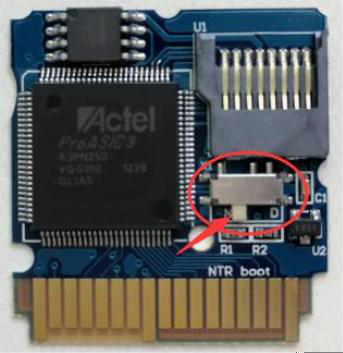
INFO
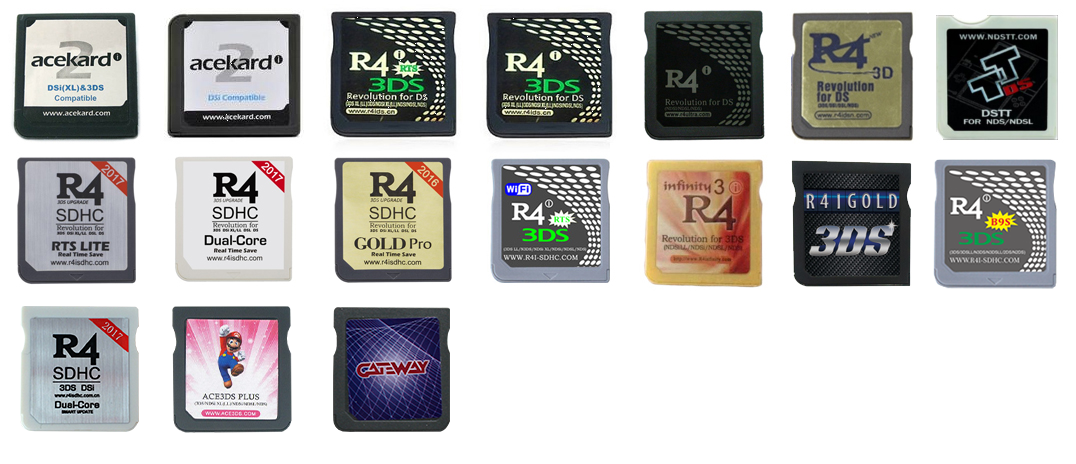
Ensure your flashcart is able to launch .nds files on your console before beginning. Some flashcarts may require firmware or "kernel" files to be copied to the flashcart SD card. Consult your specific flashcart's instructions for more information.
The usage of this exploit, regardless of the flashing method, requires access to a small magnet if the target console is of a folding style (any 3DS family system that is not the old 2DS with a sleep switch). This is because the exploit requires your console to enter sleep mode while still having access to the buttons.
Note that the flashcart will not be able to be used for its standard functions while the ntrboot exploit is installed on it (except for in the case of the Acekard 2i, which remains functional on NDS and custom firmware 3DS systems only). This means that, for most flashcarts, it will not even display on the HOME Menu. There are optional steps at the end of the ntrboot flashing instructions to remove it from your flashcart when you are done.
DANGER
Note that in some rare circumstances, it may be possible for the flashing process to brick a counterfeit flashcart and render it permanently unusable. This is unlikely, but nevertheless, only original listed flashcarts are supported. To reduce the chance of receiving a counterfeit card, it is recommended that you use a reputable site to buy your flashcart (such as NDS Card).
Flashing ntrboot (3DS Single System)
This method requires nothing more than your stock unhacked 3DS and a compatible flashcart. This method uses the flashcart to run the ntrboot flasher .nds file on your 3DS. This means that your flashcart must support launching .nds files on your 3DS's version. See the flashcart table above for more information.
TIP
Continue to Flashing ntrboot (3DS Single System)
Flashing ntrboot (3DS Multi System)
This method requires temporary access to a second 3DS family console that is already running boot9strap. This does not require your flashcart to support either 3DS's version.
TIP
Continue to Flashing ntrboot (3DS Multi System)
Flashing ntrboot (NDS)
This method requires temporary access to a Nintendo DS or Nintendo DS Lite that is compatible with your flashcart. This method uses the flashcart to run the ntrboot flasher .nds file on your NDS.
TIP
Continue to Flashing ntrboot (NDS)
Flashing ntrboot (DSi)
This method requires temporary access to a Nintendo DSi that is compatible with your flashcart. This method uses the flashcart to run the ntrboot flasher .nds file on your DSi. This means that your flashcart must support launching .nds files on your DSi's version. See the flashcart table above for more information.
TIP
Continue to Flashing ntrboot (DSi)